I have been using Obsidian for a while and I would like to access, add and edit my notes via ChatGPT regardless of where and how I access the chat. While researching I found some solutions like MCP-Obsidian but almost all MCPs required me to leave my computer on, or required installing the ChatGPT client.
This pain made me develop my MCP, and before starting to develop I mapped out some non-negotiable requirements:
- It should work in the ChatGPT mobile app.
- Being able to access it in other models such as Claude chat.
- I want to be able to turn off my computer and have the MCP keep working.
- I do not want to install anything on my computer.
- I want to be able to access it on any device that has access to my ChatGPT account
Because of these requirements above, some decisions became clear:
- I have to host the MCP.
- It will need OAuth authentication
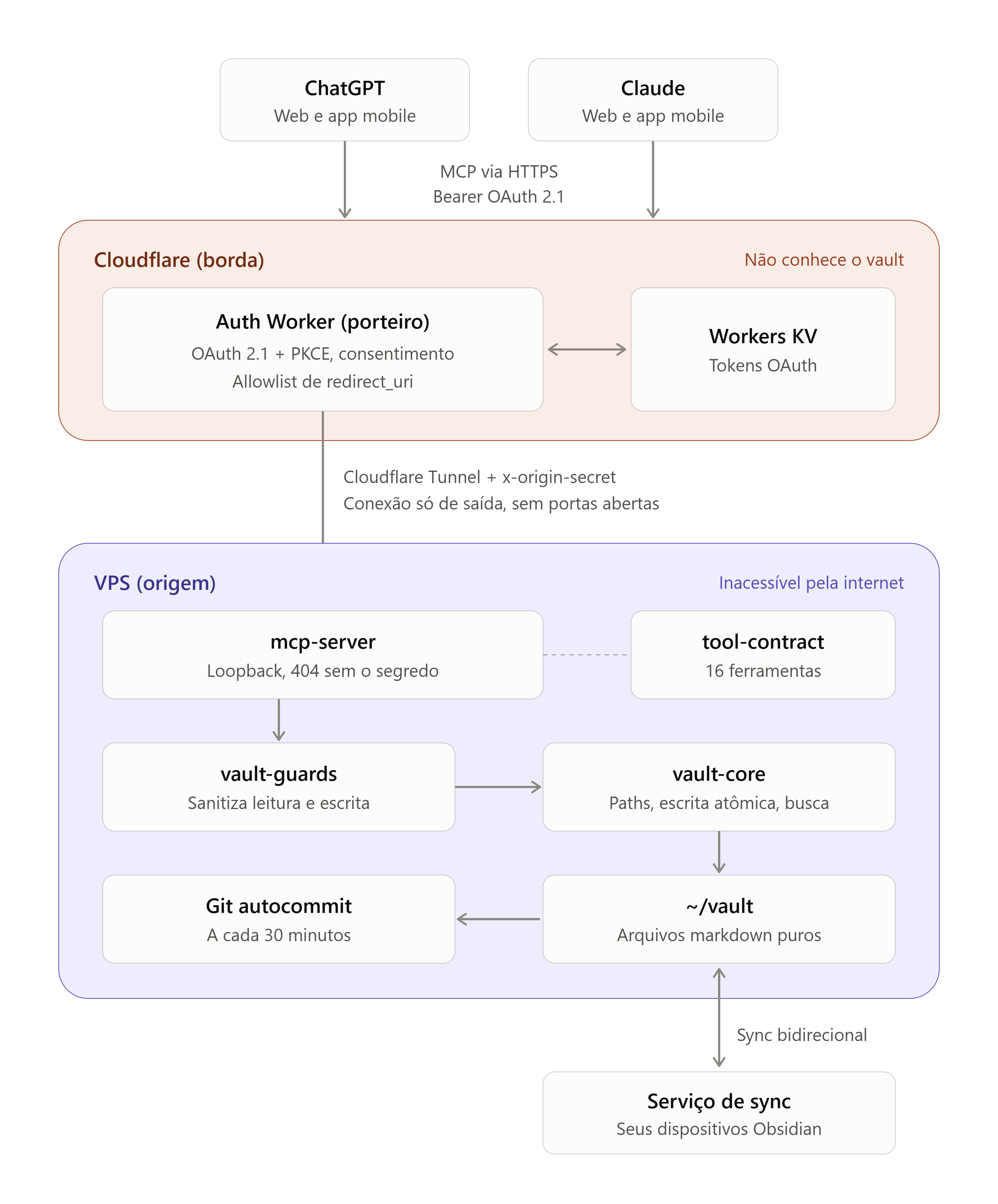
Besides that, I have to ensure the MCP is secure, since any security breach would mean exposing all my notes to the internet. To solve this problem I decided to add a "gatekeeper" in front of the MCP. This gatekeeper will only allow access from authorized providers. This gatekeeper is a worker that knows nothing about the vault, in it we implement OAuth authentication and forward the already authenticated requests to the MCP.
To further harden security, the mcp-server requires the worker to always send a header (x-origin-secret) on each request. Only the worker and the mcp-server know this secret.
In the end the architecture ended up looking something like this:
I have been using it for two months now and it has been working better than I expected. It still needs some adjustments, like making the OAuth screen look better, but it is functional and that is what matters. On my roadmap I also want to improve the VPS setup a bit, for laypeople I believe it turned out quite complicated. I believe we can improve this by creating docker images
But if you already want to install it, you can follow this tutorial.
Suggestions are always welcome :)